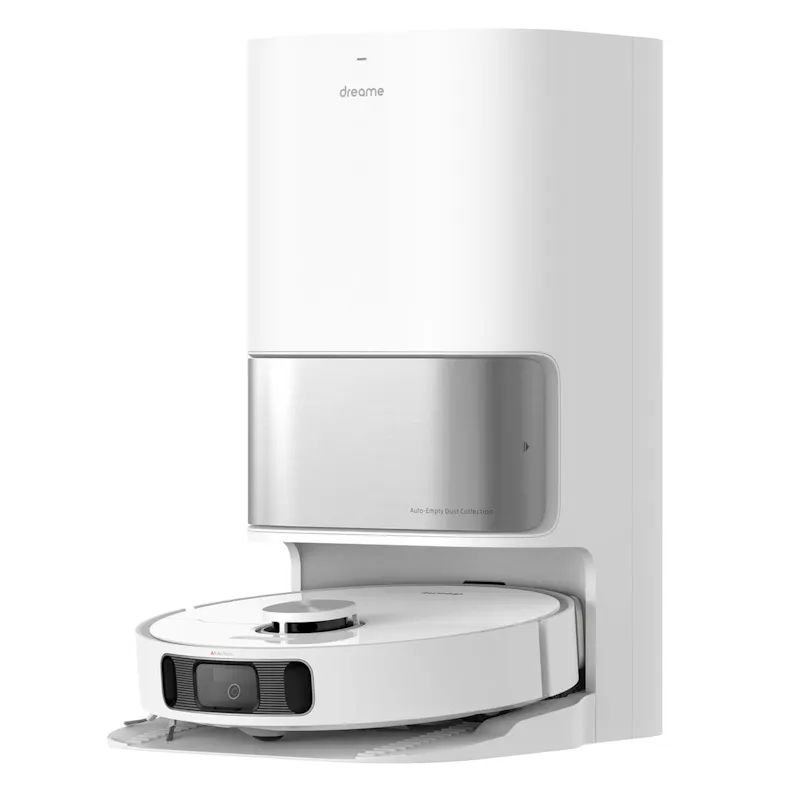
DreameL10s Ultra 1st Gen Robotic Vacuum
R8,999
About
Dreame Technology, established in 2017, is a global innovation company dedicated to revolutionising daily life convenience through cutting-edge technology. With over 4,200 patents filed worldwide and a focus on high-speed digital motors, Dreame pioneers technological breakthroughs that set new global standards. Today, 21 million+ households across 120+ countries use Dreame products, and the brand’s design and engineering have been widely recognised by Red Dot and iF Design awards. By choosing Dreame, you are opting into an elevated lifestyle that pushes the boundaries through innovation, reliability and functional design.
Take home cleaning off your to-do list with the Dreame L10s Ultra Gen 1 — a fully automated robotic floor cleaner designed for true hands-free living. Combining powerful vacuuming and intelligent mopping, this all-in-one system not only cleans your floors but also cleans and maintains itself.
With advanced AI navigation, automatic dust emptying, mop washing and drying, and precise water and detergent management, the L10s Ultra delivers a seamless, efficient cleaning experience. Whether tackling everyday dust or deeper grime, it adapts to your home and keeps every surface spotless with minimal effort.
Product Features
- Fully automated cleaning system with auto-empty, mop washing, drying, and refilling
- Powerful 5,300Pa suction for deep cleaning on hard floors and carpets
- Dual rotary mopping system with pressurised scrubbing for effective stain removal
- Intelligent AI + 3D navigation with fast mapping and precise path planning
- Smart carpet detection with automatic suction boost and mop lifting
- Self-cleaning mop system with hot air drying to reduce odours and bacteria build-up
- Large-capacity dust bag supports up to 60 days of hands-free cleaning
- Customisable room-by-room cleaning and multi-floor mapping
- App and voice control compatibility with Alexa, Siri, and Google Assistant
- Automatic detergent mixing for consistent and efficient mopping performance
Product Specifications
- Colour: White
- Navigation System: LDS with AI + 3D structured light obstacle avoidance
- Suction Power: 5,300Pa
- Battery Capacity: 5,200mAh
- Runtime: Up to 210 minutes
- Dust Box Capacity (Robot): 350ml
- Dust Bag Capacity (Base Station): 3L (up to 60 days)
- Clean Water Tank Capacity: 2.5L
- Built-in Water Tank (Robot): 80ml
- Maximum Mopping Area: Up to 200m²
- Mop System: Dual rotary, pressurised scrubbing
- Mop Lifting: Up to 7mm
- Mop Drying: Hot air drying (~2 hours)
- Brush Type: Bristleless rubber brush
- Connectivity: WiFi-enabled
- Voice Control: Alexa, Siri, Google Assistant compatible
- Dimensions: 35cm (W) x 9.7cm (H)
- Energy Rating: A / A+
- Warranty: 24 Months
- How to clean guide:
1. Turn Off and Unplug - Before cleaning, turn off the vacuum and unplug it if necessary.
2. Clean the Dustbin - Remove and replace the dustbin after every 60 - 90 days, depending on how often the vacuum is used.
3. Clean the Filters - Remove the filters: Most Dreame robots come with two filters- a primary filter and a HEPA filter. Clean the primary filter: Shake out any dirt or use a soft brush to remove debris. Clean the HEPA filter: If washable, rinse the HEPA filter gently under cold water and let it dry completely before reinserting. Tip: Clean filters regularly (every 1-2 months) to maintain suction power.
4. Clean the Brushes - Main brush: Remove the main brush by detaching it from the vacuum. Use scissors to cut off any tangled hair or debris carefully. Wipe it down with a dry cloth. Side brushes: Use a small brush or cloth to clean the side brushes. Remove any hair or dust wrapped around them.
5. Clean the Wheels - Check for debris around the wheels. Use a dry cloth or brush to clean around the wheels to ensure they move freely.
6. Check the Sensors - Wipe the sensors: Use a soft, dry cloth to gently wipe the sensors on the vacuum to avoid dirt buildup that could interfere with navigation.
7. Clean the Charging Contacts - Wipe the charging contacts: Use a dry cloth to clean the metal charging contacts on the vacuum and charging dock.
8. Reassemble the Vacuum - After cleaning all parts and allowing them to dry, reassemble the vacuum and place it back on its charging dock.
- Additional Tips:
- Do not add any liquid other than the officially-approved cleaning solution to help prevent malfunction.
- Regular cleaning (at least once a month) keeps the vacuum running efficiently.
- Check for any wear or tear, particularly on the brushes, and replace them if needed.
- This process should keep your Dreame robot vacuum in great working condition!
What's in the Box?
- 1 x Robot Vacuum
- 1 x Auto-Empty Base Station
- 1 x Side Brush
- 1 x Power Cord
- 1 x Cleaning Brush
- 1 x Dust Collection Bag
- 1 x Mop Pads (pair, pre-installed)
- 1 x Mop Pad Holders (pair)
- 1 x Multi-Surface Floor Cleaner
- 1 x User Manual
For more information, please visit Dreame.